Made with Jekyll
| .devcontainer | ||
| .vscode | ||
| _data | ||
| _includes | ||
| _layouts | ||
| _projects | ||
| _sass | ||
| _site | ||
| css | ||
| images | ||
| js | ||
| .gitignore | ||
| _config.yml | ||
| index.html | ||
| LICENSE | ||
| README.md | ||
| screenshot-overview.png | ||

Jekyll-Uno with Projects as Timeline
A Jekyll Theme, based on the Uno-Theme with a list of projects as Timeline.
How does is look
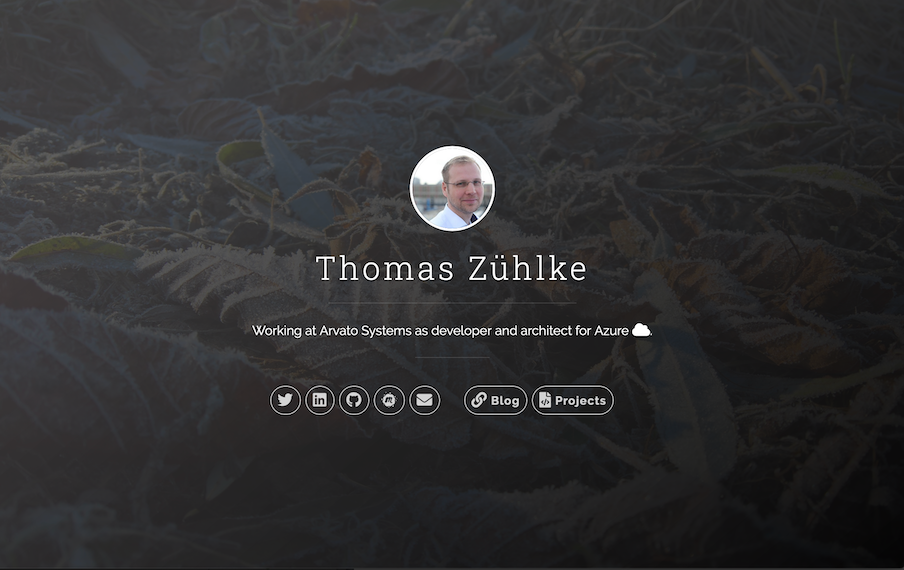


Installation/Setup
- Download or clone repo
git clone https://github.com/tzuehlke/jekyll-uno-timeline.git - Enter the folder:
cd jekyll-uno-timeline/ - Build it:
jekyll build - Start Jekyll server:
jekyll serve - Configure:
_config.yml- at least set
font_awesomeor download and add the font inhead.html
- at least set
Access via: http://localhost:4000/
Details/Features/Changes
- based on the Uno-Theme, but:
- removed everything with posts
content-wrappercan be shown or hidden with button- changed all icons to Font-Awesome
- updated google-analytics snipped
- added Meetup-Link
- removed RSS
- removed Disqus
- using a Timeline-Design instead of posts, therefore no pagination anymore
- using Timeline (CSS, HTML ) from { Personal } Jekyll Theme for a list of projects, but:
- still with 3 layouts for different screen-width, but without images on small screens
- timeline information source is now
_data/projects.yaml - always using the
timeline-inverted-class, for text on the right side of the images
- using github_api.js from Jalpc., but:
- changed the GitHub-URL for using with persons and organisations
- added watchers number